
Pausing a Moment

When I use Camtasia for work, I usually visit the TechSmith Support for a quick solution. After I learned that TechSmith had an instructional video guide, I read Danielle Ezelle’s The Ultimate Guide to Easily Make Instructional Videos. Initially I agreed with Ezelle’s statements because they correlated with R. C. Clark and R.E. Mayer’s, E-learning and the science of instruction: proven guidelines for consumers and designers of multimedia learning.  

Danielle EzelleR. C. Clark and R.E. Mayer
Tutorials are videos that show step by step instructions.Transformational graphics show how an object changes over time.  
Content creators can feel overwhelmed or obsessed with the need to make perfect videos.Minimize extraneous processing, do not add decorative text or images.  Stick to representational graphics that are relevant for instruction.
Keep videos short.Avoid cognitive overload. Chunk out lessons.
A table that summarized what Ezelle and Clark and Mayer wrote about video tutorials

However, I think that Ezelle’s steps for creating an instructional video is impractical for creating software tutorials. If you provide software training and support, then you will, at some point, create new training material before you are fully comfortable with a program. When time is short, creating a tutorial handout can benefit your learners and you.

Creating Content

Storyboards show one sequence at a time with a panel for text, audio, and an image, or like the example below, provide step-by-step instructions by row. Even though I work with an eLearning student assistant, breaking down the narration and the edit notes takes so long that that we never add screenshots.
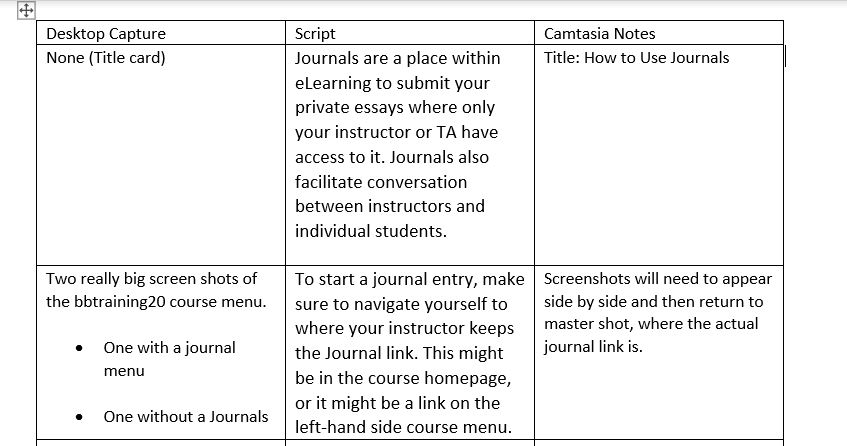
Screen capture of storyboard with just text for journal tutorial.
Screen capture of a typical storyboard at work

For the same amount of time and effort the student worker or I can create a handout that provides an introduction, match screenshots with narration, and add any visual cues to clarify a series of steps. Below is a handout that was used for a two-part tutorial. We used most of the text as a script and just used rectangles instead of arrows as visual cues.
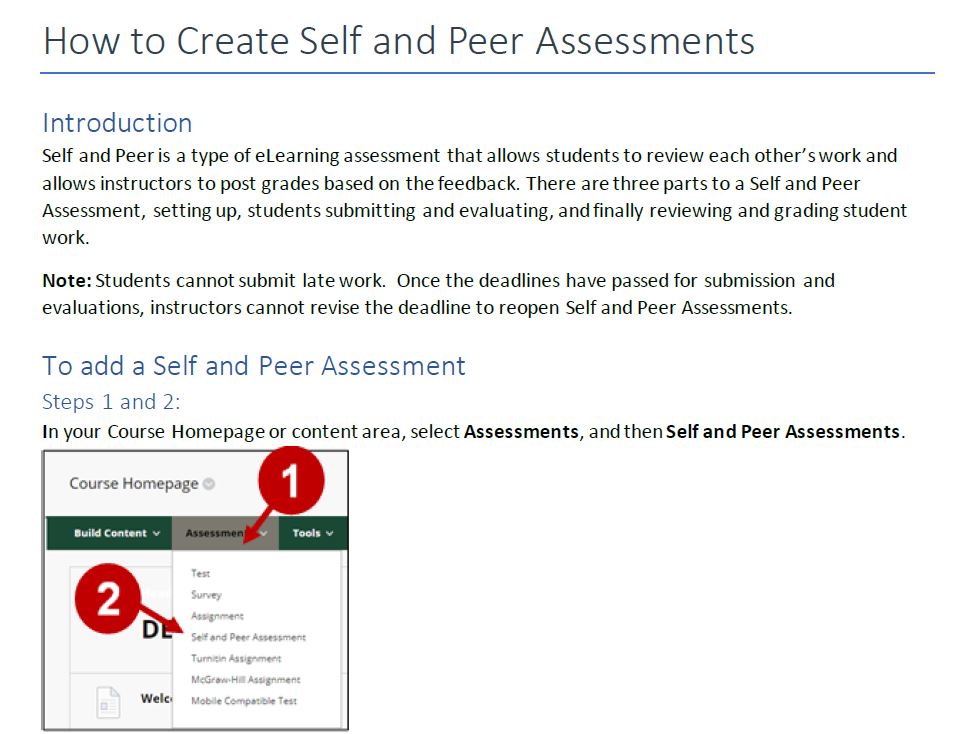
screen capture of self peer review handout with introduction and steps with instructions and images.
Screencapture of an eLearning handout

Creating a handout can also provide trainers a chance to practice and memorize software commands before recording a video. Clark and Mayer identify three steps that a trainer would follow.

  1. Selecting words and images – Prime for learning by capturing images that illustrate the official documentation or software notes.
  2. Organizing words and images – Arrange text and images into a sequence that engages working memory.
  3. Integrating – Publish the tutorial and provide training for others.

After I complete a handout, I either practice for a training session or a video.

Wrapping Up

Although I am skeptical about storyboards for software videos, I agree with Ezelle’s recommendation to practice and prepare for a recording. Because I create a handout, my production is different, but it can be outlined in seven steps.

Danielle Ezelle’s StepsMy Steps
Step 1: Determine and get to know your audienceStep 1: Receive documentation or notes
Step 2: Write a storyboard and scriptStep 2: Create handout
Step 3: Record your narrationStep 3: Identify audience
Step 4: Record your screen or capture videoStep 4: If needed, create script from handout. Practice.
Step 5: Edit the videoStep 5: Record audio and video
Step 6: Add a video introStep 6: Edit, add intro and outro
Step 7: Share your videoStep 7: Share my video
Comparing Ezelle’s steps to mine for creating tutorials

My work does not require me to provide other types of videos, but I look forward to creating seeing if creating other videos make me reconsider storyboards.

Posted in

11 responses to “Thinking about Planning (and Thinking)”

  1. jwisdom08 Avatar

    June,

    I really liked your comparison between Ezelle and Clark and Mayer. The third comparison you mention “Keep Video Short” really goes hand in hand with “Avoiding cognitive overload. Chunk out lessons.” In my experience with short videos the producer crams so much information into it it causes cognitive overload. For me, it’s a great reminder to keep it short and consider the amount of material that goes into a video.

    I do like the use of a handout for your software training because it appears that it can be used for training and post training support as well as a partial storyboard. To your point, if you need to add a script you can add it to the handout. It seems like your process works for you to meet the learners need and expectations of department.

    I would be interested the learn more about the decision to put “Identify audience” as your third step after the creation of the handout. Typically, I see an audience analysis prior to creating a handout, job aid, email, etc., to determine how and what to communicate to the audience.

    You brought up some great points and a good reminder for me to not forget about cognitive load when developing material.

    Liked by 1 person

    1. junehaldeman Avatar

      Hi Jeremy,

      Thanks for reading my post. To answer your question, because I primarily train and support Blackboard, this means there are always instructor settings and students settings that need tutorials. However, for new training, the student worker and I may have to train a specific group first.

      When a department or a student organization want to use the new software or setting, but not as originally intended, then we go back and review the handout. If the new users need more clarification. then we usually try clear up the confusion by revising the script for the rest of the campus. This can result a short explanation before the demo starts or even splitting the video into two parts.

      I hope that answers your question. You bring up a good point about identifying the audience first. Learning management systems like Blackboard and Canvas already have a built in audience, so I doubt the steps I shared work in every situation.

      Like

  2. Kristen Thomson Avatar
    Kristen Thomson

    Hey June,

    I really enjoyed your reflection on the TechSmith Guide as I decided to do my assignment reflecting on this same topic.

    As I was reading through your reflection, I was thinking the same thing as Jeremy about identifying your audience’s needs as a first option as I like to do all of that information gathering upfront before I make my videos. One thing that I felt the TechSmith Guide fell short on was working with SMEs and Stakeholders in order to “fail fast” as I think it’s imperative to storyboard content and present ideas to SMEs and Stakeholders to sign off on the accuracy and tone of the video. In your role, are you the SME? Or do you require collaborations with stakeholders when making content?

    One thing that I like that you also highlighted is content overload…keep is short and sweet. One thing that I think that the TechSmith Guide could have done is talk about what is ideal length for a video. I know that starts going into a conversation about microlearning, but for me I try not to let my videos exceed 5-7 minutes and if I need to address multiple objectives, I try to chunk videos in a modularized series.

    Fantastic job and reflection this week, June!

    Like

    1. junehaldeman Avatar

      Hi Kristen,

      Thank you for reading my post. I also hate creating long videos, but sometimes a Blackboard walkthrough can run eight minutes long because of all the mentions that Information Technology or my own department wants. You are right, providing a storyboard or handout prior to a recording helps an SME and stakeholder approve or ask for more clarification. The training team is considered the SME for using Blackboard and other third party tools. You can argue the only exception is Qualtrics. Although we provide basic training, there are times when we have to refer users to seek help or feedback from Qualtrics directly.

      Since Jeremy and you both mentioned that it was unusual to identify the audience as third, I realize that I should have pointed out that creating videos for a learning management system typically does not lend itself to much variation aside from tests and grading. All students have to submit online work the same way regardless of major or their year. If instructors want to create a test or an assignment, they also have to follow the same steps. It probably sounds like I am working more than necessary, with the possibility of not providing the information the learners need.

      It’s because I am overpreparing. We ask instructors how do they want students to work online before training, but sometimes the instructors want to wait until the training day to ask. Even if they do state what they want, I may provide a different setup or two. This happens most often with online tests because there is a multitude of question formats and grade options. If the trainers see a pattern with the questions, then we revise our documentation and script.

      I hope this answers your question, but please let me know if I missed something.

      Like

  3. Mary Avatar
    Mary

    June, super interesting blog post with a lot of great insights! I appreciate the comparative points you highlighted between Danielle Ezelle’s blog and Clark & Mayer’s book. I’m also enjoying the discussions happening in the comments. I find it helpful to read about your personal design process. I feel I can learn a lot from you because I also work in higher education. I would really like to find ways to improve my own process and develop eLearning objects and training in which learners would find useful. Thanks for sharing!

    Like

    1. junehaldeman Avatar

      Hi Mary,

      Thanks for reading and providing feedback. I am glad that you liked the breakdown between Ezelle’s blog and Clark and Mayer’s book. It was a relief to know that common practice and theory connect. Reading what Kristen and Jeremy do is also very helpful. How I prepare software training may not work other situations.

      Like

    2. junehaldeman Avatar

      Hi Mary,

      I forgot to mention that I also feel the same reading your posts from last semester and seeing how you use Canva. Higher Education is interesting. There are so many different departments and ways to support the students, the faculty, staff, and administration.

      Like

  4. Ashley Tutera Avatar

    Hi June,
    I resonate with the idea of a handout so much! I love the idea of videos, but even with the little information we have begun to look at in this course, I see that a video is not always needed. Your handouts can be just as effective and more efficient to produce and maintain. I talked about the idea of a throwaway take in my blog, but I like your handout idea better and think they can go hand-in-hand. I can take my information from my throwaway take and convert it to a handout for my storyboard. Then, if the handout is all that is necessary to complete the learning objective, then we can be done! If not, we have a really good idea of what needs to be recorded and can quickly make a video with a supplemental job aid. Great idea!

    Like

    1. junehaldeman Avatar

      Hi Ashley, thank you for reading my blog. I am glad that it might help.

      Like

  5. amandabuddenhagen Avatar

    Hi June, I appreciate the way you laid out your thought process on this post. I am completely new to the field and have never used Camtasia before, but the layout of the steps you are going to take really helped me have an idea of how to get started. I like your idea of creating a handout to guide the trainer. This is a great post, thanks again!

    Like

    1. junehaldeman Avatar

      HI Amanda, thanks for reading my blog. I hope it proves useful. As I mentioned before, these steps may not apply for every situation. However, it is interesting how a handout could be useful for both trainer and learner.

      Like

Leave a comment